
ToolKITZ
The top drawer your Mac was missing.
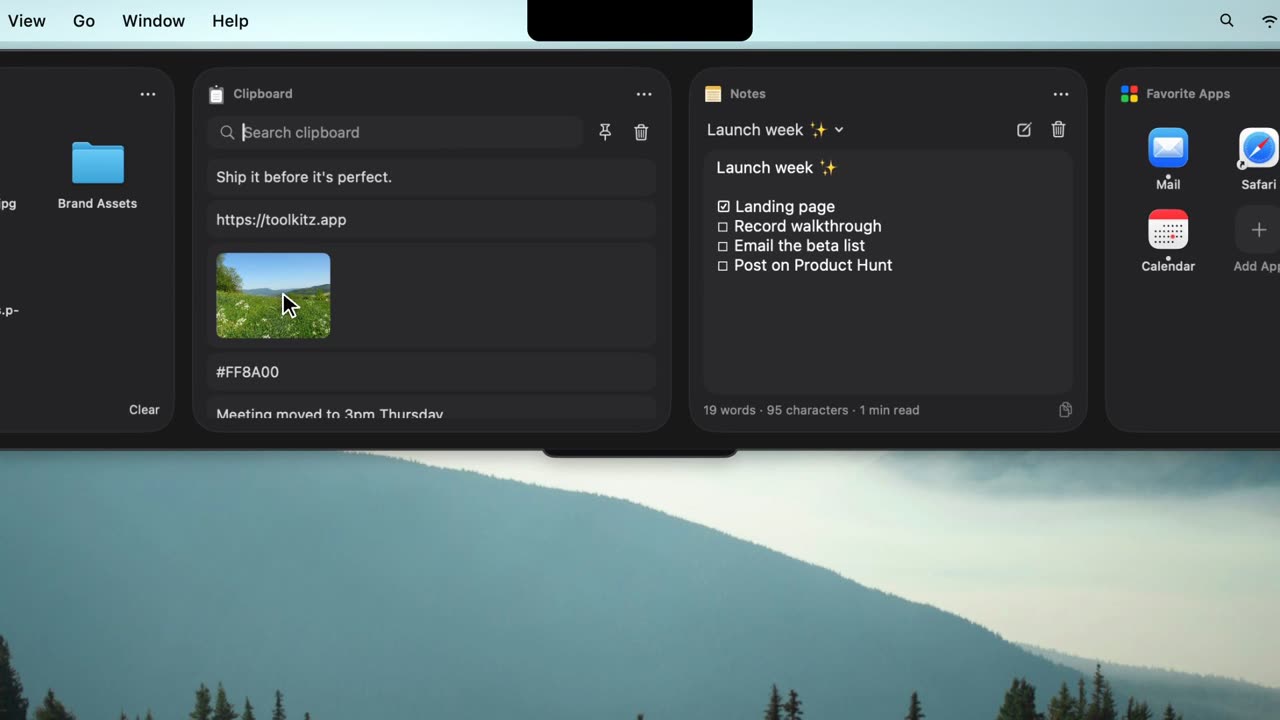
ToolKITZ is a panel that drops down from the top of your Mac's screen holding a file shelf, clipboard history, notes, text capture and more than 70 modules, and hides when your cursor leaves. The File Shelf stores references so originals stay in place, letting you drag files in and out of apps. Clipboard history saves text, links, images and files with search, pinning and plain-text paste, and can skip password manager entries. Text Capture lets you draw a box over any on-screen text to copy it, and it also reads QR codes and barcodes. Modules include notes, to-dos, a focus timer, calendar and weather, and you can connect services like Stripe and GitHub with your own keys. Open it by scrolling at the top edge, hovering the notch, dragging a file up or pressing Control-Option-T, in Graphite, Glass or Black styles.
Key Features:
- Top Drawer Panel: drops down from the top edge or notch
- File Shelf: drag files in and out without moving originals
- Clipboard History: search, pin and plain-text paste
- Text Capture: copy on-screen text, QR codes and barcodes
- 71 Modules: notes, to-dos, focus, calendar, Stripe and GitHub
ToolKITZ gives your Mac a handy top drawer for everyday tools, free for the core features with Pro from $29.99 a year.



