
Minimal Paste
Quick access to your clipboard history and folders.
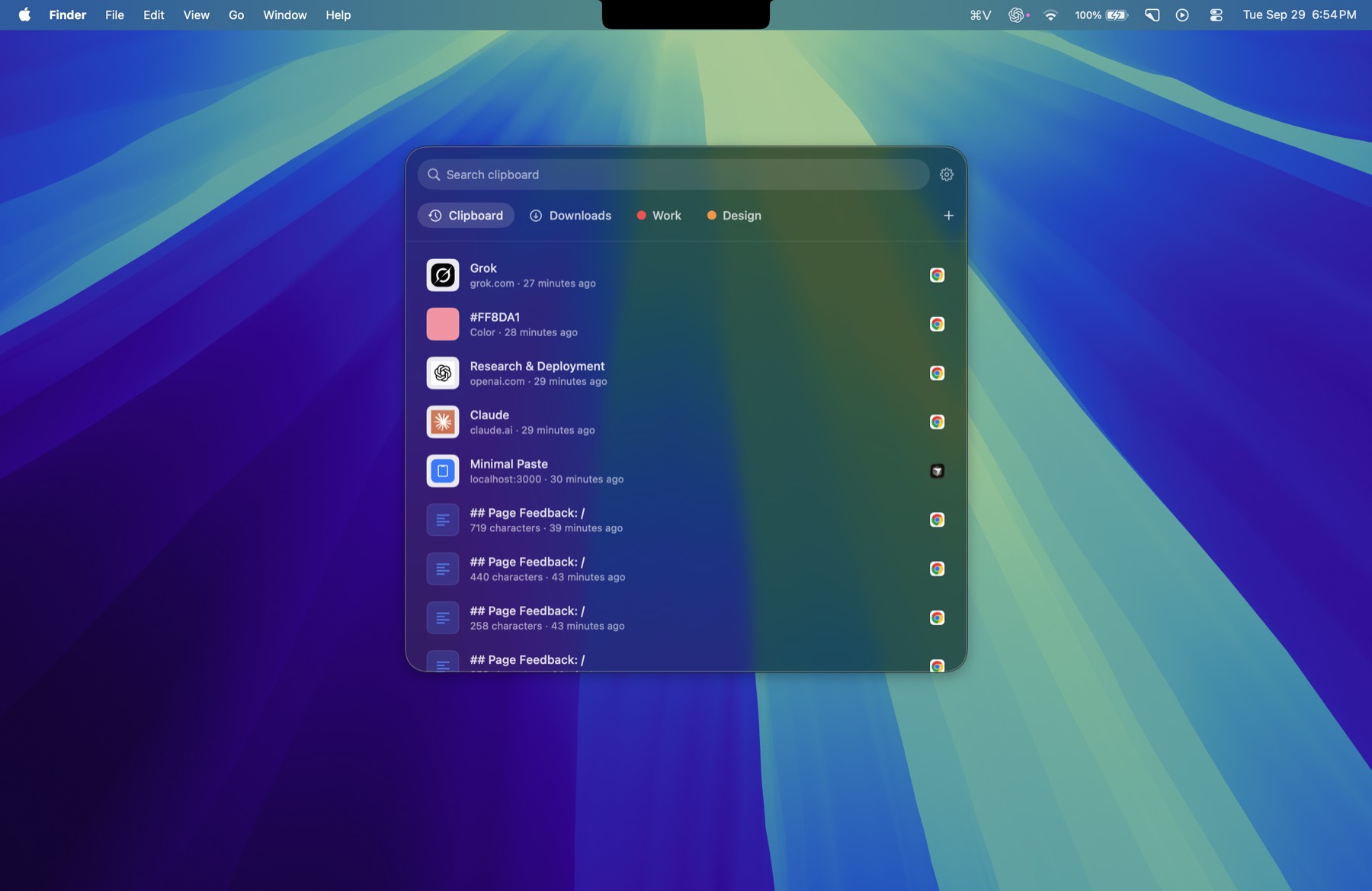
Minimal Paste is a local-only clipboard manager for Mac that brings everything you copied back in a keystroke. Press Shift-Command-V to open the shelf, use the arrows to move and Return to paste straight into the app you were using. The shelf filters as you type across text, images, links, files and colours, and pinned clips stay put no matter what your retention settings are. You can group clips with a name and colour, select several clips and paste them together, and add any folder, including subfolders such as Downloads or Screenshots, to paste the files inside. Place the shelf on the bottom, left or right edge, attached or floating, or in a window. Password managers are ignored and your history never leaves your Mac, with no account and no iCloud.
Key Features:
- Clipboard History: text, images, links, files and colours a keystroke away
- Pins and Groups: keep favourite clips and organise them by colour
- Folder Shelf: paste files from Downloads, Screenshots or any folder
- Bulk Paste: select several clips and paste them together
- Custom Shelf: bottom, left, right or window, attached or floating
Minimal Paste is a fast, private alternative to pricier clipboard apps, with a 7-day free trial and a one-time $9.99 price for up to three Macs.



