
Packtray
Catch. Pack. Ask.
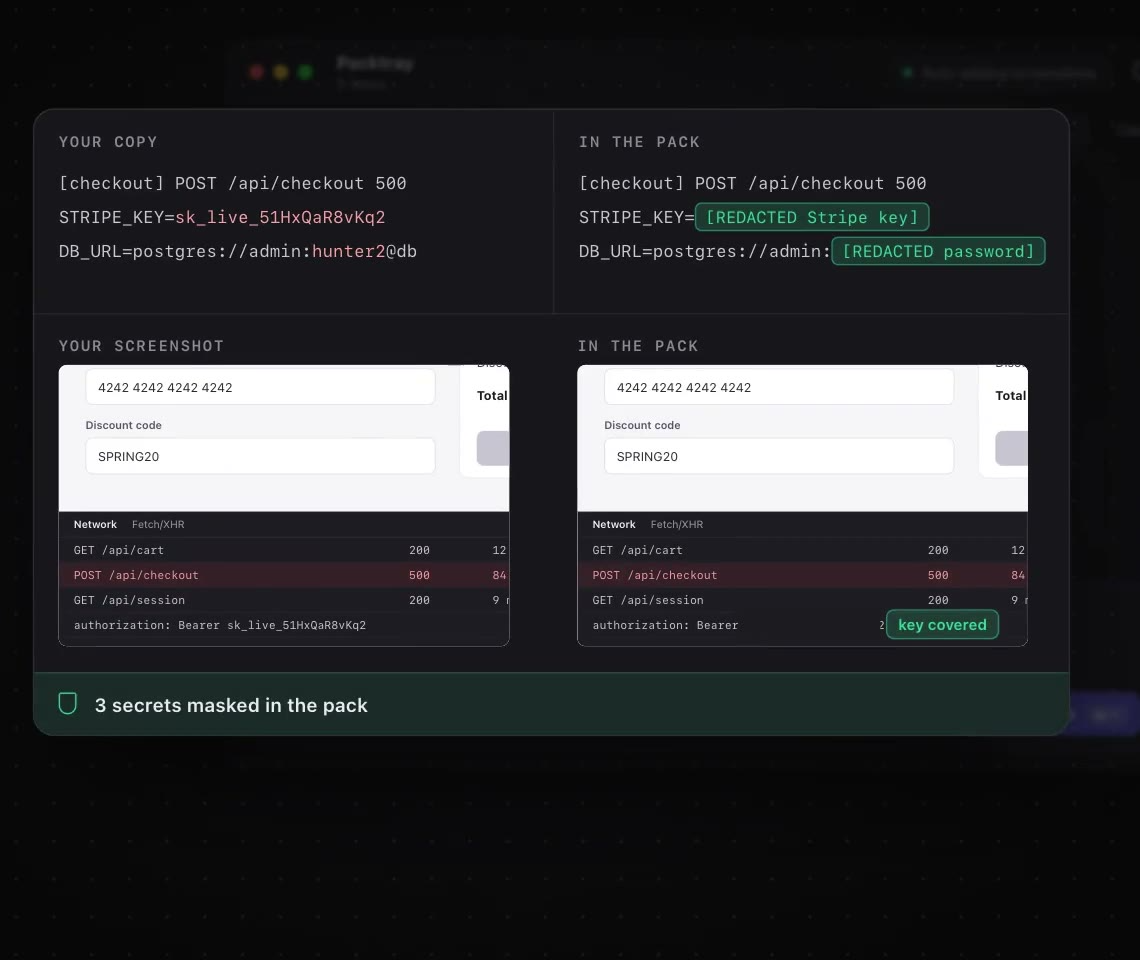
Packtray collects screenshots, copied text, files and notes into one clean handoff for any AI. While you work, every screenshot lands in the tray automatically and you can add copied errors with a shortcut, drop in files and write a note about what you need. One click turns everything into a numbered pack with a CONTEXT.md file, masks API keys and secrets on the way and shrinks big images. Then drag the pack into ChatGPT, Claude, Codex, Cursor, Gemini or any AI chat, and your message is copied as it lands. It's fully keyboard driven, runs on Mac and Windows, and works entirely on your machine with no account, server or uploads.
Key Features:
- Automatic Capture: screenshots, copied errors, files and notes collect in one tray
- One-Click Packs: numbered context packs with a CONTEXT.md summary
- Secret Masking: API keys and passwords are hidden before sharing
- Works with Any AI: ChatGPT, Claude, Codex, Cursor, Gemini and more
- Local Only: no account, no server and no uploads
Packtray makes it effortless to give AI tools the full context of a bug or task, with a free plan and a one-time license.



