The Best Kyno Alternative for Mac (2026)
Looking for a Kyno alternative on Mac? We compare Kyno and Stringout on pro format support, footage and dialogue search, transcription, assembly and price.
In this guide+
Kyno earned its place on a lot of editors' Macs by doing one unglamorous job really well: opening a card or drive full of camera media and letting you preview, log, tag and transcode it before the edit starts. It's a one-time purchase and it still does that job. So why look for a Kyno alternative? Usually it's because logging by hand is the slow part now. You still scrub every clip to find the shot, you still read through interviews to find the line, and you still build the first stringout yourself.
Stringout takes those steps off your plate. It's a free media asset management app for the Mac that finds the shots, transcribes the interviews and builds the stringout for you, with the AI running on your own machine and your footage staying on your own drives. Below is an honest comparison, including the cases where Kyno is still the better pick.
Quick verdict
| Stringout | Kyno | |
|---|---|---|
| Best for | Finding shots and lines fast, then a synced first assembly | Hands-on logging, tagging and transcoding |
| Price | Free; Pro $24 per seat/month | One-time license from $159 (Premium costs more) |
| Platforms | macOS | macOS, Windows |
| Pro formats | ARRIRAW, BRAW, R3D and ProRes read in place | Wide format support for preview and playback |
| Footage search | Describe a shot or type half a line of dialogue | By filename, metadata, tags and markers |
| Transcription | Unlimited and on-device | Not built in |
| First assembly | Auto-syncs picture and sound and builds a cut from your selects | You build it in the NLE |
| Remote editors | File Streaming puts team media in Finder (Pro) | Share drives or exports |
Short answer
If you want to search footage by what's in it and what was said, and get a synced first cut into Premiere Pro, DaVinci Resolve or Final Cut Pro, get Stringout. If you mainly want a fast offline viewer for tagging, subclipping and transcoding with a one-time license, Kyno still does that well.
Why editors look for a Kyno alternative
Kyno isn't a bad app, and plenty of assistant editors still swear by it. But the job around it has changed, and the same wishes keep coming up:
- Search by content, not filenames. “A_0012C004” tells you nothing. Editors want to type “wide shot of the bridge at dusk” and get the clip.
- Find the line, not the file. On interview-heavy projects, the real time sink is finding where someone said the thing. That needs a transcript, and Kyno doesn't make one.
- Skip the manual stringout. Syncing picture to sound and laying out selects is routine work that software can do now.
- Remote teams. Shipping drives to an editor in another city is slow and risky.
What is Stringout?

Stringout
FreemiumIn our directoryCamera to timeline for free.
A media asset management app for post-production on the Mac. It finds the shots, transcribes the interviews and builds the stringout for you, while your footage stays on your own drives.
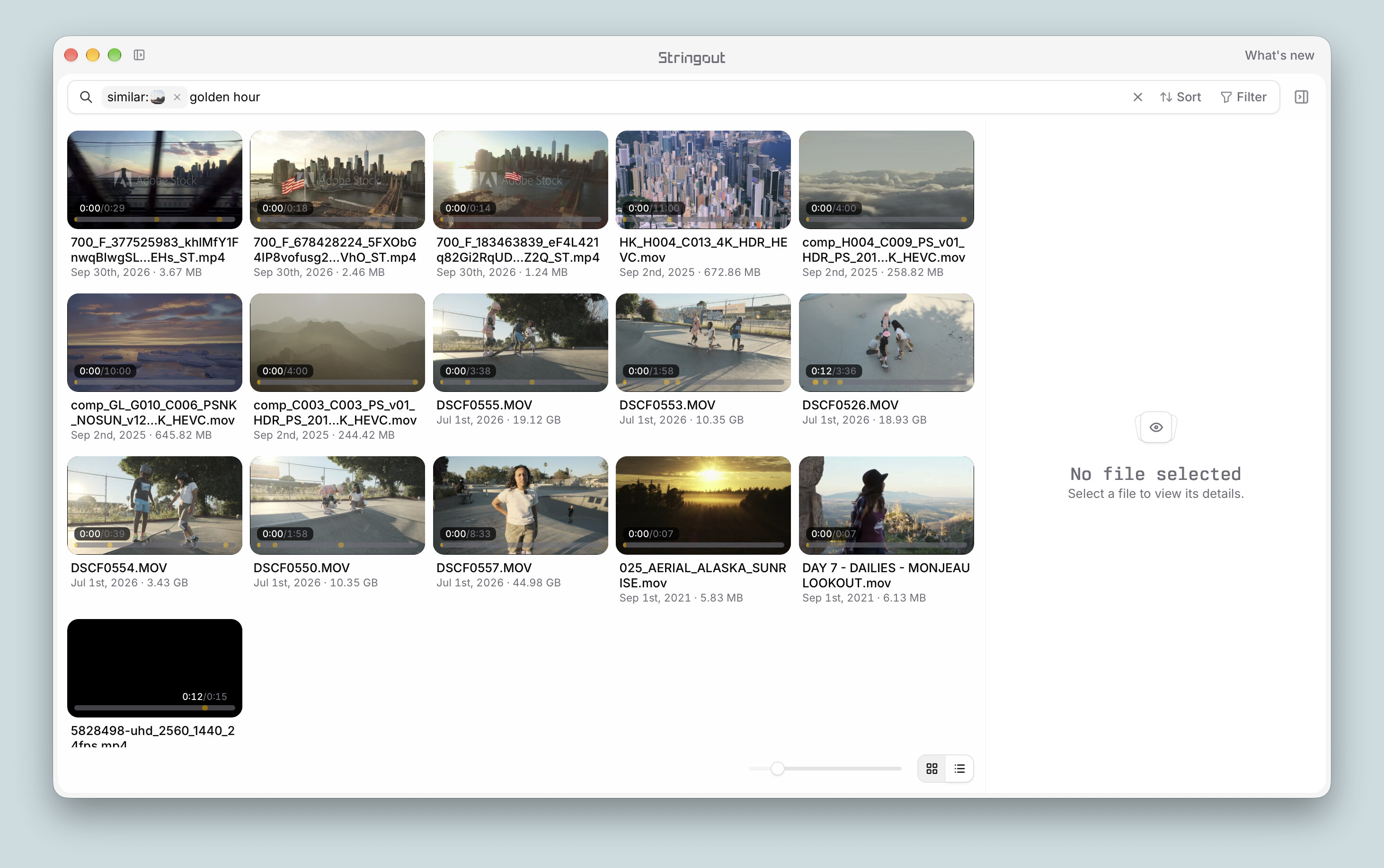
View on TryMacApps→Point Stringout at a shuttle drive or RAID and it reads picture and sound in place, including ARRIRAW, BRAW, R3D and ProRes, without copying or moving anything. It indexes what's in each shot and transcribes every word with on-device AI, so you can search across every drive you've indexed, even ones that aren't plugged in. When you've picked your selects, it syncs picture to sound and sends a first cut straight to your editor.
Stringout vs Kyno: the details
Ingest and pro formats
Both apps are built to open camera media without a round trip through an NLE. Kyno is known for broad format support and a quick viewer, and its Premium tier adds verified offloads and more transcoding options. Stringout reads ARRIRAW, BRAW, R3D and ProRes in place from wherever your media lives, so there's no extra copy step before you can start searching. If your camera originals are on a RAID, they stay there.
Search and transcription
This is the big difference. In Kyno you find things through the metadata you or the camera added: names, tags, markers, clip info. That's precise, but only as good as your logging. Stringout analyzes the picture and transcribes the sound, so you can describe a frame or type half a line of dialogue and jump right to it. Transcription is unlimited on the free plan and runs on your Mac, which matters when the footage is under NDA and can't go to a cloud service.
Getting to the first cut
Kyno can export clips and subclips with their metadata, but building the assembly is still your job in the NLE. Stringout's auto-assemble syncs picture to sound and builds a first cut from your selects, which you can take straight into Premiere Pro, DaVinci Resolve or Final Cut Pro. It also handles multicam projects and VFX pulls, which are exactly the chores an assistant editor wants to hand off.
Pricing
| Plan | Stringout | Kyno |
|---|---|---|
| Free | The full app, on-device AI search, unlimited transcription and auto-assemble | Free trial |
| Paid | Pro at $24 per seat per month: File Streaming for remote editors and larger libraries | One-time license from $159, with a pricier Premium tier |
If you hate subscriptions, Kyno's one-time license is appealing. But Stringout's free plan isn't a trial: you get the search, transcription and assembly for good. Pro is for teams that want remote editors working from the same media without shipping drives.
When Kyno is still the better choice
I'd rather you end up with the right tool, so stick with Kyno if:
- You work on Windows, or across Mac and Windows.
- Your workflow is built around detailed manual logging, tags and subclips.
- You rely on its transcoding and verified offload features day to day.
- You want a one-time purchase for a team and don't need remote file streaming.
Who should switch to Stringout
- You cut documentaries, interviews or branded content where finding the right line is half the job.
- You're an assistant editor who builds stringouts, syncs and multicams on every project.
- Your footage is confidential and can't be uploaded for transcription.
- You work across many shuttle drives and want to search them even when they're unplugged.
- You have remote editors and you're tired of shipping drives.
How to switch from Kyno to Stringout
- 1Download Stringout from stringout.com and open it on your Mac.
- 2Add the drives or RAID where your media lives. Stringout reads it in place, so nothing gets copied.
- 3Let it index and transcribe. Everything runs on your Mac.
- 4Search for shots and lines, then mark your selects.
- 5Run auto-assemble and send the synced first cut to Premiere Pro, DaVinci Resolve or Final Cut Pro.
The bottom line
Kyno is still a dependable, buy-once tool for previewing, tagging and transcoding camera media, and if that's all you need there's no rush to leave. But most editors searching for a Kyno alternative want to spend less time logging and more time cutting. Stringout searches every shot and every spoken word on your own Mac and hands you a synced first assembly, and since the full app is free, trying it on your next project costs nothing.
Frequently asked questions
What is the best Kyno alternative for Mac?+
For most editors it's Stringout. It's free, reads ARRIRAW, BRAW, R3D and ProRes in place, searches footage and dialogue with on-device AI, and builds a synced first cut for Premiere Pro, DaVinci Resolve or Final Cut Pro.
Is Stringout free?+
Yes. The app, on-device search, unlimited transcription and auto-assemble are free. Pro costs $24 per seat per month and adds File Streaming for remote editors and larger libraries.
Does Stringout upload my footage?+
No. Stringout reads media where it already lives and runs its AI and transcription on your Mac. Footage only moves if you turn on File Streaming with Pro.
Can Stringout transcribe interviews?+
Yes. It transcribes on-device with no limit, so you can search every interview by typing part of what was said.
Is Kyno still worth using in 2026?+
Yes, if you want a fast offline viewer for logging, tagging and transcoding with a one-time license, or you need it on Windows.
Discover more great Mac apps
Browse our growing directory of beautiful, useful Mac apps from developers around the world.
Explore the directory →