The Best BoltAI Alternative for Mac (2026)
Looking for a BoltAI alternative on Mac? We compare Vinaa and BoltAI on price, updates, organization, models and privacy, plus Raycast AI, Alter, Fluent, Msty and Jan.
In this guide+
Disclosure
Vinaa paid for an Editor's Choice placement on TryMacApps. The placement includes this guide and featured spots on our alternatives pages, so keep that in mind as you read our recommendation.
BoltAI is one of the most capable AI clients on the Mac. It works with your own API keys and local models, and it has grown to include agents, dictation, inline editing and far more besides. So why look for a BoltAI alternative? Usually for one of two reasons: you spend most of your time in plain chat and want that part to be excellent, or you'd rather not think about renewing a license to keep getting updates.
Vinaa is built around exactly that. It's a native Mac app for everyday AI chat, with projects, nested folders, tabs and a lifetime license that includes every future update. It also leaves out a lot of what BoltAI does today, so the right choice depends on how you use AI. Below we compare the two, then look at how Vinaa stacks up against Raycast AI, Alter, Fluent, Msty, Jan and ChatGPT.
Quick verdict
| Vinaa | BoltAI | |
|---|---|---|
| Best for | Everyday chat that stays organized | An AI toolkit that also works inside other apps |
| One Mac | $30 through Nov 30, 2026, then $99 | Pro at $99 for 2 devices ($59 in its current sale) |
| Updates | All future updates included | 1 year on Pro and Pro+, then optional renewal; included on Lifetime ($399) |
| System | macOS 15 or later, Mac only for now | macOS 13 or later, with a mobile app in beta |
| Sync | Optional, through your private iCloud | BoltAI Cloud, which needs active updates |
| Models | Your API keys, ChatGPT or Claude plans, Ollama, LM Studio | Your API keys, ChatGPT or Claude plans, Ollama, LM Studio |
| Inside other apps | Not yet (planned) | Inline editing, dictation and more |
| MCP | Remote servers (local planned) | Local and remote servers |
Short answer
If you want a tidy, native home for all your AI chats and a license you never have to renew, get Vinaa. If you need agents, dictation, image generation or AI inside your other apps today, BoltAI is still the more complete tool.
Why people look for a BoltAI alternative
BoltAI isn't a bad app. Its breadth is the main reason to buy it. But the same few wishes tend to send people looking elsewhere:
- A focus on chat. With 100+ features advertised, BoltAI does a lot. Some people only want to ask questions, compare models and find old answers.
- No renewal to think about. BoltAI's Pro and Pro+ licenses are perpetual, but updates and Cloud Sync stop after the first year unless you renew. Lifetime removes that, at $399 regular price.
- Sync on their own account. BoltAI's sync runs through its own cloud. Some people prefer to keep chats in their personal iCloud.
- Better organization at scale. Once you have hundreds of chats, how you file and find them matters more than any single feature.
What is Vinaa?

Vinaa
PaidIn our directoryAll your AI chats in one Mac app.
A native Mac app for chatting with cloud and local AI models in one place, with projects, folders, tabs and your conversations stored on your Mac.
View on TryMacApps→Vinaa connects to OpenAI, Anthropic, Google, Mistral AI, xAI, DeepSeek and OpenRouter with your own API keys, and to local models through Ollama and LM Studio. You can switch models in the middle of a conversation and set a default for each project. It's built with SwiftUI and AppKit, stores your chats on your Mac, keeps API keys in the macOS Keychain and sends requests directly to the provider you pick. The license covers the app only, so you pay model providers for what you use.
Vinaa vs BoltAI: the details
A note on sources: pricing comes from each company's own site, checked in November 2026. Many of the feature differences come from Vinaa's published comparison, which was written by Vinaa's developer, so treat those as a starting point and check BoltAI's documentation for anything that decides it for you.
Organizing and finding chats
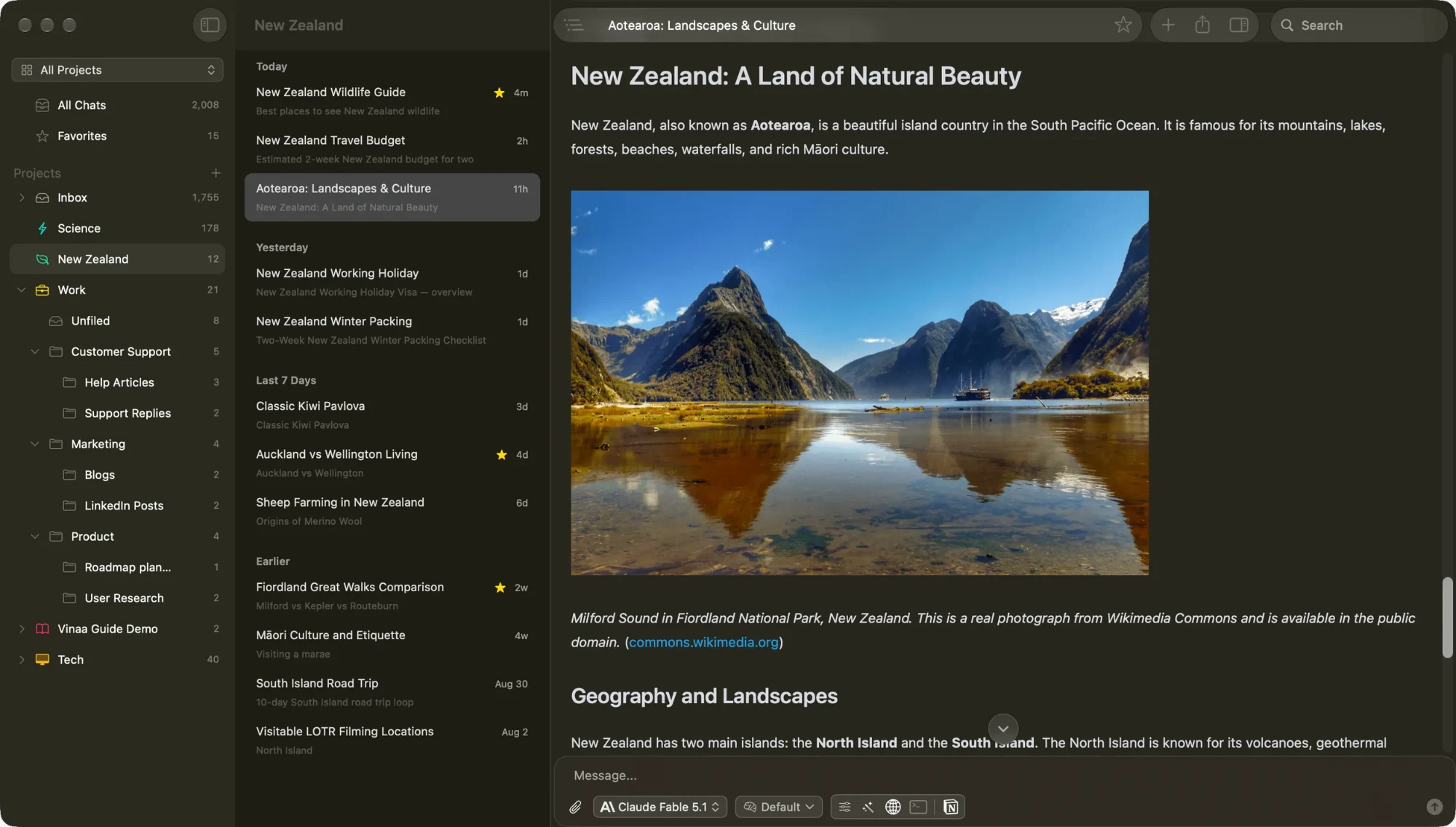
This is where Vinaa is strongest. Both apps have projects, nested folders, favorites, project defaults and full-text search. Vinaa adds optional AI filing, which puts new chats into the right project folder, and lets you search and reuse files from earlier chats. Different projects can sit in separate windows with chats as tabs, and the same chat can open in more than one window. BoltAI uses one main window plus companion chat windows.
Reading long answers
Vinaa's conversation outline lets you jump through a long chat by message or heading, and Vinaa's developer says they found no equivalent in BoltAI. Vinaa renders Markdown natively with TextKit, while its comparison says BoltAI uses a WebView. BoltAI hits back with HTML code-block preview, message editing, branching and side-by-side model comparison, none of which Vinaa has yet.
Models and connections
On model access, the two are close. Both work with your own keys, custom OpenAI-compatible endpoints, Ollama, LM Studio, Apple Foundation Models, Codex CLI and Claude Code. Both let you switch models mid-chat and set reasoning controls. BoltAI goes further with Gemini CLI and GitHub Copilot integrations, plus advanced sampling controls such as temperature and Top P. If you tune those settings often, that's a real point for BoltAI.
Privacy and sync
Both apps store chats locally and connect directly to the providers you choose, and your prompts still go to whichever cloud provider you select. The difference is sync. Vinaa uses your private iCloud account and your own iCloud storage. BoltAI uses BoltAI Cloud, with 1 GB on Pro and 5 GB on Pro+ and Lifetime, and it stops working if your updates plan lapses. In exchange, BoltAI can sync to its mobile app, which Vinaa can't match until its planned iPhone app ships.
AI outside the chat window
This is where BoltAI is clearly ahead. It offers dictation, read-aloud, inline editing in other apps, reusable agents, memory, image generation and local MCP servers. Vinaa is a chat app first. All of these except read-aloud appear on Vinaa's list of planned or upcoming features, but the comparison gives no dates, so buy based on what ships today.
Pricing
| Macs | Vinaa (sale through Nov 30) | Vinaa (from Dec 1) | BoltAI (regular price) |
|---|---|---|---|
| 1 | $30 | $99 | Pro: $99, covers 2 devices |
| 2 | $39 | $129 | Pro: $99 |
| 3 | $55 | $159 | Pro+: $199 |
| 5 | $90 ($18 per Mac) | Not listed | Lifetime: $399 |
| Updates | Lifetime | Lifetime | 1 year, except Lifetime |
BoltAI is also running a Black Friday sale, with Pro at $59, Pro+ at $119 and Lifetime at $239. Compare what you'd pay over time as well as today. At regular prices, one Mac costs $99 for good with Vinaa. BoltAI Pro starts at $99 too, and renewing at $59.40 a year for two more years brings it to $217.80. That said, renewal is optional, BoltAI keeps working on the last version you have, and Pro covers two devices where Vinaa's two-Mac license is $129. Both offer a 30-day refund, Vinaa has a free 14-day trial, and neither price includes cloud model usage.
When BoltAI is still the better choice
Stick with BoltAI if:
- You use AI inside other apps throughout the day, through inline editing or dictation.
- You rely on agents, memory, local MCP servers or linked local folders.
- You edit earlier messages, branch conversations or compare models side by side.
- You need a mobile app today.
- You're on macOS 13 or 14, since Vinaa needs macOS 15.
Who should switch to Vinaa
- Most of your AI use is conversation, and you have a growing pile of chats to organize.
- You work across several clients or topics and want separate projects, windows and default models.
- You want all future updates included, with no renewal to plan for.
- You'd rather sync through your private iCloud than a vendor's cloud.
- You're moving from the ChatGPT or Claude apps and want to bring your history along.
How Vinaa compares with other BoltAI alternatives
BoltAI isn't the only option here, and depending on what you need, one of these may fit better than either. You can browse more on our BoltAI alternatives page.
| App | Best for | Price |
|---|---|---|
| Vinaa | Organized everyday chat | $99 once ($30 through Nov 30) |
| Raycast AI | AI inside a launcher | From $10/month or $96/year |
| Alter | Dictation, meetings and actions | Free with your own keys; Pro $240/year |
| Fluent | AI inside other apps | From about $49 once |
| Msty Studio | A free local and online AI workspace | Free; Aurum $149/year or $349 once |
| Jan | Free, open-source local AI | Free |
| ChatGPT | OpenAI's models only | Free app, with paid plans |
Vinaa vs Raycast AI
Raycast is a launcher first, with clipboard history, notes, window management and extensions alongside its AI. If you'd use all of that, it's hard to beat. AI needs a paid plan, even with your own keys: Pro is $10 a month or $96 a year with 500 AI credits a month. Vinaa is the better fit for long-running work, with nested folders, multiple windows, ChatGPT and Claude import, and LM Studio support. Vinaa's comparison also says Raycast routes some bring-your-own-key traffic through its servers, while Vinaa sends requests straight from your Mac.
Vinaa vs Alter
Alter is a wider assistant, with dictation, meeting recording and notes, screen awareness and custom actions, and its core app is free with your own keys or local models. Managed cloud models are $240 a year, or $720 for life. Vinaa does less but goes deeper on chat, with nested folders, heading navigation and iCloud sync between Macs. Choose Alter if you want one assistant across meetings and apps, and Vinaa if you want a dedicated chat app.
Vinaa vs Fluent
Fluent focuses on AI inside your other apps. Its Smart Panel works with the text you've selected, and it adds dictation and scheduled actions. If most of your AI use is rewriting text where you already are, Fluent is the stronger pick. Per Vinaa's comparison, Fluent has one chat window and lacks projects and folders, which is where Vinaa is better for keeping long-term work together.
Vinaa vs Msty and Jan
If local models are your priority and you don't want to pay, start with Jan, which is free and open source, or Msty Studio, whose core desktop app is free and supports Ollama, Llama.cpp and MLX. Both also connect to online models. Vinaa doesn't run models itself. It connects to Ollama or LM Studio, and earns its price through a native interface and chat organization.
Vinaa vs ChatGPT
The ChatGPT app is the easy default if you only use OpenAI's models. Vinaa makes sense once you want Claude, Gemini, local models and ChatGPT in one place. You can import your ChatGPT history, and if you pay for ChatGPT or Claude, Vinaa can connect to those plans with some extra setup rather than API keys alone.
How to switch from BoltAI to Vinaa
- 1Download Vinaa from vinaa.ai and start the free 14-day trial. It needs macOS 15 or later.
- 2Add your API keys, or connect a ChatGPT or Claude plan, Ollama or LM Studio.
- 3Create projects and folders for your main areas of work, and set default models for each.
- 4Import any ChatGPT or Claude history. Vinaa doesn't list BoltAI as an import source, so keep BoltAI installed for older chats, or export the ones you need.
- 5Save your common prompts as templates, which you can insert by typing a forward slash.
The bottom line
BoltAI remains the more complete AI toolkit for the Mac, and if you use its agents, dictation and inline tools, there's little reason to leave. But if you mainly chat with AI and want those conversations organized and easy to find, Vinaa is the more focused choice, with every future update included. Its 14-day trial makes it easy to test on real work, and the sale price of $30 for one Mac runs through November 30, 2026.
Frequently asked questions
What is the best BoltAI alternative for Mac?+
For everyday AI chat, it's Vinaa. It's a native Mac app with projects, nested folders and tabs, it works with cloud and local models, and its lifetime license includes all future updates. If you need AI inside other apps, look at Fluent or Alter.
How much does Vinaa cost?+
It's a one-time payment. Through November 30, 2026, it's $30 for one Mac, $39 for two and $55 for three. From December 1 it's $99, $129 and $159. AI usage is billed separately by your provider, unless you use local models.
Is Vinaa cheaper than BoltAI?+
For one Mac over several years, usually yes, because Vinaa includes all future updates. BoltAI Pro has the same $99 regular price and covers two devices, with an optional renewal of $59.40 a year for updates and Cloud Sync. BoltAI Lifetime is $399 regular price. Both are discounted right now.
Does Vinaa have a free version?+
It has a free 14-day trial, and purchases come with a 30-day refund window.
Can Vinaa run local AI models?+
Yes, through Ollama and LM Studio. You install and run the models there, and Vinaa connects to them.
Can I import my BoltAI chats into Vinaa?+
Vinaa lists import from ChatGPT and Claude, not from BoltAI, so plan on keeping BoltAI around for older conversations.
Does Vinaa work on iPhone or Windows?+
Not today. Vinaa runs on Intel and Apple silicon Macs with macOS 15 or later. An iPhone app is planned, and its developer has no plans for Windows, Android or Linux.
Discover more great Mac apps
Browse our growing directory of beautiful, useful Mac apps from developers around the world.
Explore the directory →